
General Information
When you’re first installing Lync Server 2010, there’s some confusion out there as to why you would or wouldn’t choose the option, “Deploy First Standard Edition Server” option. Every Lync 2010 Server in your deployment will hold a copy of your Lync Server 2010’s topology configuration called the Central Management Store (CMS). These copies are located in a SQL 2008 Express instance called rtclocal on each Lync Server 2010 Server. A very good post on the CMS can be read here. The purpose of this article is not to explain what the CMS is, but how you go about utilizing the setup process of Lync to deploy the CMS if your first pool is a Standard Edition Server or an Enterprise Pool.
To help understand the difference, I wanted to preface the remainder of my post with a couple images that were taken from Jen’s excellent CMS post which I linked to in the above paragraph.
This first image shows how the CMS database is placed in the first Enterprise Edition Pool. With this setup, we can see we have two Front End Servers (FE1 and FE2) which are collocated within the same Enterprise Pool. Each of these servers have SQL 2008 Express which contain the rtclocal instance that contains a copy of the Master CS on the BE SQL Server which would be a SQL Standard or SQL Enterprise. A key thing to note here, is that the SQL BE Server has only one instance called rtc. From a CMS standpoint, this rtc instance contains the master xds database. The xds database is the cms database. This rtc instance also holds your other Lync databases: cpsdyn, lis, rgsconfig, rgsdyn, rtc, rtcdyn, rtcab, rtcab1, and rtcdyn.
 al
al
This second image shows how the CMS database is placed in the first Standard Edition Server. The key difference here, is we can see that on this first Standard Edition Server, we see two instances; rtclocal and rtc. We can see, that because we do not have a dedicated BE server as we would in an Enterprise Edition Server, we collocate that dedicated rtc instance on the SE Server which will hold the same databases that the rtc instance would on the first Enterprise Edition Pool; the master xds database, cpsdyn, lis, rgsconfig, rgsdyn, rtc, rtcdyn, rtcab, rtcab1, and rtcdyn. But this SE Server will also have the same rtclocal instance that Enterprise Edition FE Servers would have that would contain a copy of the xds instance. Because of this, from a CMS standpoint, the first SE Server would contain two instances; one with the master xds and one with the replica xds. Any subsequent Standard Edition Front End Servers (and any other Lync Server 2010 Server in the environment) would only have the rtclocal database holding a copy of the master xds as there can only be one Pool (Standard Edition Pool or Enterprise Edition Pool) that can hold the master CMS role.
It is possible, however, to move the CMS Master role to a new pool after the fact in case you deployed a Standard Edition Front End first such as a Pilot and then later deploy Enterprise Edition Pools such as when determining the pilot is a success and going full production. A very good blog article that explains this process can be read here.

Let’s take a look at how we accomplish the setup if our first Front End will be a Standard Edition and how it differentiates with an Enterprise Edition Front End.
Standard Edition Setup
Now when running setup.exe for Lync Server 2010, one of the deployment options you can see is “Prepare first Standard Edition Server.”
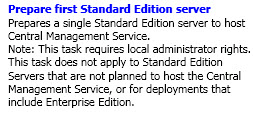
You will only want to run this option when you are deployment the first Lync Server 2010 Standard Edition Server in your deployment and you don’t already have any Lync Server 2010 Enterprise Edition Front End Servers.
What the Prepare first Standard Edition server does is simple. It creates the rtc instance if it does not exist already and it creates the xds master database within the rtc instance. This creates a Service Connection Point (SCP) record in Active Directory that allows any future deployment options to know how to locate the CMS information. Taken from Jen’s blog article, “The SCP is an object in Active Directory created under the path of the following Distinguish Name (DN), CN=Topology Settings, CN=RTC Service,DC=<domain>, of type msRTCSIP-GlobalTopologySetting. This object contains the msRTCSIP-BackEndServer attribute, which specifies the FQDN of the master and the instance name of the SQL Instance. All tools use the SCP to locate and connect to the CMS master.”
If you ever wondered how the Topology Builder automatically knows how to find and download Topology Information, the Topology Builder queries this SCP record, uses the msRTCSIP-BackEndServer attribute, contacts the FQDN of the master, and downloads the topology information.
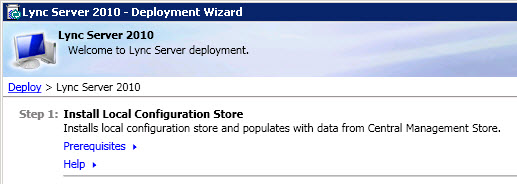
Now because the rtc instance has been created with the xds database, when you go to run the actual install, you will see “Install Local Configuration Store” which will install the rtclocal instance which contain a copy of the master xds database. The regular databases will still be installed in the rtc instance.
Enterprise Edition Setup (Read the Standard Edition section first to fully understand this section)
Now when deploying the first pool in your Lync Server 2010 deployment happens to be an Enterprise Edition Pool, you won’t bother with the “Prepare first Standard Edition server” option. When taking a look at the first Standard Edition Front End, you can see we needed to create the rtc instance first with the master xds. The same thing happens with the Enterprise Edition but in a different fashion. Because this is an Enterprise Edition Pool, you will be using a SQL Standard or SQL Enterprise. During the Topology Builder process, you need to define your SQL Server unlike a Standard Edition Deployment. When publishing your Enterprise Edition Pool, at that time your rtc instance is being created on your SQL Server as well as the xds database. Just like with the Standard Edition deployment, the SCP record in AD is getting created.
Now when running the Setup below and choosing “Install Local Configuration Store,” the Setup Process is creating the rtclocal instance (SQL 2008 Express) local to that Enterprise Edition Front End Server and then goes out to the master xds database that is on the SQL Standard or SQL Enterprise Server, and then creates a copy of that xds database on the Enterprise Edition Front End Server.

Can some one please provide me with the downloads for the Lync 2010 and Lync 2010 server : February 2012 Hotfix? CZ 858
http://support.microsoft.com/kb/2666709: Return of P2P Video Calls in Lync for RCC Enabled Users
http://support.microsoft.com/kb/2670326: CU5 Description
http://support.microsoft.com/kb/2493736: CU5 Updates
Direct Download URLs: http://www.microsoft.com/download/en/details.aspx… Server CU5 Download
http://www.microsoft.com/download/en/details.aspx… Client 64bit CU5 Download (Version 7577.4072)
http://www.microsoft.com/download/en/details.aspx… Client 32bit CU5 Download (7577.4072)
For the sql 2008 r2 sql dedicated backed, do i need to create a RTC named instance, or is the default instance fine? There are some confusing articles out there.
Josh
You can use the default or a named instance. In the Topology Builder when defining SQL Backend, it'l have a radio button to use the default instance and another radio button to enter the name of the instance.
Elan, For the new front end pool file share can I use a hidden share?
No, don't use a hidden share. I've had another person try this and I had to fix it as there were a ton of issues with it.
No. Ok. I'll do this. I thought I had to somehow import the 2007 r2 topology into 2010 first. Not sure how I do that.
That's after you have Lync deployed. You merge topology and then import configuration.
Elan,
We have an OCS 2007 R2 enterprise setup. one front end, one edge server and a dedicated SQL 2008 ent. backend.
Im confused on the next step. I've been reading the deployment guide and migration document, but its a bit fuzzy about the next step, which you've shed some light on here. thanks.
But, When I go to run "Install Local Configuration Store" and run "retrieve directly from Central Management Store I get "Automatic collection of configuration data failed". Where is the central management store? How do I install it/troubleshoot this error?
Thanks,
Josh
Lync Standard Pool or Lync Enterprise Pool?
Enterprise pool
Did you do the following?
1. Install Topology Builder Tools
2. Definite Enterprise Edition Front End Topology including the File Share and SQL Server it talks to
3. Publish Topology which creates the Central Management Server Databases and Front End Databases on your SQL Server?
The above must be done in an Enterprise Deployment to allow you to run Install Location Configuration Store on a Front End Server which installs SQL 2008 Express on the local Front End Server and creates a copy of the CMS (xds database) on the local server's SQL Express install.
Your post is a great source of knowledge for me, each point you discuss over here is valuable and admirable. Thanks for the great share, keep it continue.
There can be only one CMS DB, is it per pool or per Active directory irrespective of number of pools?
There can only be one CMS Master "Pool" in the environment. So if your Front End Pool is highly available, so is your CMS. If you first deployed a Standard Pool and then a HA Pool, you would want to move CMS to the Enterprise Pool so CMS becomes Highly Available.
Thank you, this is irrespective of number of pools there can be only one CMS Master right?
Correct.
Definitely a great article. Elan… By default in SE all the DBs get installed in C: , is it possible to have all these DBs installed in different drive or SAN/DAS storage? I heard we can do this using SQL management studio, is that supported?
I haven't seen anything saying that it is unsupported. I would probably advise against it. Keep in mind that the usage from a drive space will be very minimal. In OCS 2007 R2, a 100,000 user pool would use approximately 10GB of space. I have not seen any metrics in Lync but it would be about the same and the usage was so minimal the above statement wasn't carried over to Lync. So personally, I would just make sure you have a few GB free for the Standard Edition databases on C:\ and you'll be covered.
In coexistance mode OCS & Lync are not able to communication on voice / video, desktop sharing except presence & IM session, on lync & OCS media ports are disabled.
Great Post Elan. With regards to moving the CMS SQLbackend – I would suggest that in situations where where a Pilot deployment was done on a Standard Edition Server that it might be more straightforward to simply create a new Enterprise Pool with the appropriate SQL backend and then moving the Pilot users over to the new Enterprise Pool. This would be less risky than performing the staged backend move that Scott documents.
Of course its nice that there is a documented procedure to do this if required.
Moving the CMS Backend and the Pool Backend are two completely different things. What I suggest is what you basically said. If you're doing a pilot, you definitely do want to then deploy your Enterprise Pool. But the CMS is different from the Pool's SQL Databases. Even if you deploy a new Enterprise Pool with its own SQL Backend, the CMS Master Database is still assigned to your pilot pool. You still want to move the CMS Master to be assigned to the new Pool which will allow the CMS Master to now be Highly Available.
Your post is a great source of knowledge for me, each point you discuss over here is valuable and admirable. Thanks for the great share, keep it continue.
Thanks for that. Much appreciated.
can i have a link where i can download it !!
with Lync Standard, is it possible to use an external SQL server, or can it only use the local SQL Express?
Nope. It can only use SQL Express on the same box that Standard gets installed on. If you want to use a remote SQL Server, you need Lync Enterprise.
Excellent article
How can I move an enterprise pool on a new sql 2008 r2 be server?
I have read that it is possible by using an interim standard edition server for the cms but what if I have not one already setup? Is it still possible?
Thanks
You have to use an interim pool. Unfortunately, the Lync Admin Tools don't allow you to just swap the BE it points to.
Helpful post, Elan, HIGH FIVE man!
Excellent article, Elan! Also, thanks for the link to NextHop. :-)
Great Work Man keep it up.!
Great post!