
So the last month I’ve been learning how to do PowerShell scripting. I’m new at scripting and figured I would share my first Exchange script due to sheer excitement. I’d like to give a special thanks to Shay Levy @ https://blogs.microsoft.co.il/blogs/ScriptFanatic. Shay has been a tremendous help over @ https://powershellcommunity.org when I run into issues that any typical novice runs into (especially with scripting). The other folks have been a great help as well.
I started this script last week and will be adding to it as I gain more knowledge. The skeleton of the script is complete with 1 function so far (to get disk information) and will allow me to easily add more functions to the script. I wanted to provide a method to dynamically check if a server was an Edge Server and prompt for authentication to allow PowerShell to obtain information from my Edge Servers.
With an Edge server, it is not going to be a part of your corporate domain . It may be a part of a forest/domain dedicated in your DMZ, but not your corporate forest/domain. Typically if you want to pull information from a domain-joined machine that is a part of your corporate domain, you just run a command against it and it’ll work if you have the access to do so. But since the Edge server is a part of a workgroup or DMZ forest/domain, it’s not that easy. This script will check if you are trying to check an Edge Server, and if so, it will display on the console that it is checking for Edge authentication and prompt you for credentials for that Edge Server.
Here’s the script I have so far:
# Define what paramters (-role) can be utilized when running the switch
Param(
[string] $role = "All"
)

# Define what values (Mbx, Cas, Etc.) can be utilized when using our -role parameter
switch ($role)
{
	Mbx { $role = "IsMailboxServer" }
	Cas { $role = "IsClientAccessServer" }
	Um { $role = "IsUnifiedMessagingServer" }
	Hub { $role = "IsHubTransportServer" }
	Edge { $role = "IsEdgeServer" }
}

# Test host to see if it replies to ping prior to allowing information gather functions to proceed.
function Ping-Host
{
       $result = Gwmi -Query "SELECT * FROM Win32_PingStatus WHERE Address='$server'"
       if ($result.statuscode -eq 0) {$true} else {$false}
}

# Function to display disk information.  If the server being checked is an Edge Server, you will be prompted for authentication.
function Get-DiskInformation
{
	""
	"Server: $server"
	if ($server.isEdgeServer)
	{
                $erroractionpreference = "SilentlyContinue"
		$cred = Get-Credential
		if ($cred) { $disk = Get-WmiObject Win32_LogicalDisk -namespace root\cimv2 –filter "DriveType = 3" -ComputerName $server -Credential $cred }
		else { Write-Warning "Could not obtain disk information for $server due to no credentials being provided" ; break }
                $erroractionpreference = "Continue"
	}
	else { $disk = Get-WmiObject Win32_LogicalDisk -namespace root\cimv2 –filter "DriveType = 3" -ComputerName $server }

	foreach($d in $disk)
	{
		$obj = New-Object PSObject
		$obj | Add-Member NoteProperty "Size(G)" ([math]::round($d.Size/1GB,2))
		$obj | Add-Member NoteProperty "Freespace(G)" ([math]::round($d.FreeSpace/1GB,2))
		$obj | Add-Member NoteProperty "Used(G)" ([math]::round($d.Size/1GB - $d.FreeSpace/1GB,2) )
		$obj | Add-Member NoteProperty "Freespace(%)" ([Math]::Round((($d.FreeSpace/1GB) / ($d.Size/1GB) * 100),2))
		$obj | Add-Member NoteProperty "Usedspace(%)" ([Math]::Round(((1 - ($d.FreeSpace/1GB) / ($d.Size/1GB)) * 100),2))
		$obj
	}
}

# Place servers into the $colServers variable which will later be fed into Functions
if ($role -ne "All" -and $role -ne "IsEdgeServer") { $colServers = Get-ExchangeServer | Where-Object {$_.$role -eq "True" -and $_.IsEdgeServer -ne "True"} }
elseif ($role -ne "All" -and $role -eq "IsEdgeServer") { $colServers = Get-ExchangeServer | Where-Object {$_."IsEdgeServer" -eq "True"} }
else { $colServers = Get-ExchangeServer }

if (!$colServers) { Write-Warning "There are no servers of the specified type to gather information for." }
else
{
	foreach ($server in $colServers)
	{
		if (Ping-Host -eq "$true")
		{
			Get-DiskInformation
		}
		else
		{
			Write-Warning "$server is not pingable"
		}
	}
}
There’s one piece of the script I want to disuss. It’s the function for Get-DiskInformation. I used to have the function written as such.
function Get-DiskInformation
{
	""
	"Server: $server"
	$(if ($server.isEdgeServer) { Get-WmiObject Win32_LogicalDisk -namespace root\cimv2 –filter "DriveType = 3" -ComputerName $server -Credential (Get-Credential) }
	else { Get-WmiObject Win32_LogicalDisk -namespace root\cimv2 –filter "DriveType = 3" -ComputerName $server }) | `
	Format-Table -autosize DeviceID,VolumeName,`
	@{Label="Size(G)";Expression={[math]::round($_.Size/1GB,2)}},`
	@{Label="Freespace(G)";Expression={[math]::round($_.FreeSpace/1GB,2)}},`
	@{Label="Used(G)";Expression={[math]::round($_.Size/1GB - $_.FreeSpace/1GB,2)}},`
	@{Label="Freespace(%)";Expression={[Math]::Round((($_.FreeSpace/1GB) / ($_.Size/1GB) * 100),2)}},`
	@{Label="Usedspace(%)";Expression={[Math]::Round(((1 - ($_.FreeSpace/1GB) / ($_.Size/1GB)) * 100),2)}}
}
Now the issue with how I used to have it written is that it forces Format-Table and a specific style. So essentially, I am forcing the output to look a certain way. There’s no way for the user to dynamically change the way the output appears and will mess up the formatting if you wanted to place the data into an Excel sheet for example.
Now let’s take a look at the way I have it in the final script I posted.
function Get-DiskInformation
{
	""
	"Server: $server"
	if ($server.isEdgeServer)
	{
                $erroractionpreference = "SilentlyContinue"
		$cred = Get-Credential
		if ($cred) { $disk = Get-WmiObject Win32_LogicalDisk -namespace root\cimv2 –filter "DriveType = 3" -ComputerName $server -Credential $cred }
		else { Write-Warning "Could not obtain disk information for $server due to no credentials being provided" ; break }
                $erroractionpreference = "Continue"
	}
	else { $disk = Get-WmiObject Win32_LogicalDisk -namespace root\cimv2 –filter "DriveType = 3" -ComputerName $server }

	foreach($d in $disk)
	{
		$obj = New-Object PSObject
		$obj | Add-Member NoteProperty "Size(G)" ([math]::round($d.Size/1GB,2))
		$obj | Add-Member NoteProperty "Freespace(G)" ([math]::round($d.FreeSpace/1GB,2))
		$obj | Add-Member NoteProperty "Used(G)" ([math]::round($d.Size/1GB - $d.FreeSpace/1GB,2) )
		$obj | Add-Member NoteProperty "Freespace(%)" ([Math]::Round((($d.FreeSpace/1GB) / ($d.Size/1GB) * 100),2))
		$obj | Add-Member NoteProperty "Usedspace(%)" ([Math]::Round(((1 - ($d.FreeSpace/1GB) / ($d.Size/1GB)) * 100),2))
		$obj
	}
}
As you can see, it looks quite different. What I did here was create a PowerShell object. This allows me to add data to this object which in return allows me to pipe our command into many different outputs such as Format-Table, Format-List (which will be default since there are >=4 lines of data being returned), Excel, etc.. I’ve also added other error checking such as if you don’t enter a user/password for your Edge Server, it won’t throw a bunch of errors on the screen. Instead, it will provide a nice warning message letting you know credentials were not provided.
Let’s take a look at an example at pulling only disk information for a Mailbox (and yes this is a testlab and Exchange is running on my DC which I would never do in production!).
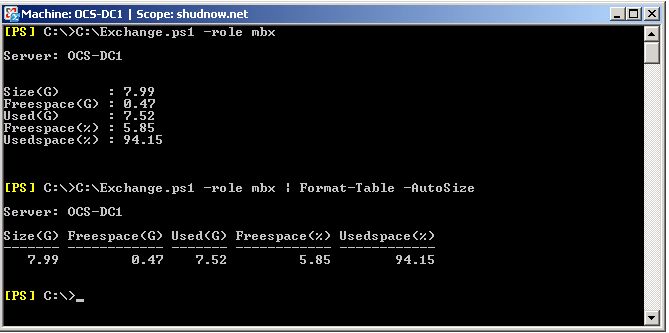
So what happens if we didn’t specify the -role command or specified All for the role command? The same thing will happen since -role switch is automatically assumed and the default for the command is All.

Since we selected All, it found an Edge Server in the environment but the script runs a ping test on all servers before trying to obtain information. Since our Edge Server was down, we were notified of this. Now after bringing my Edge Server online, let’s run a -role All again.
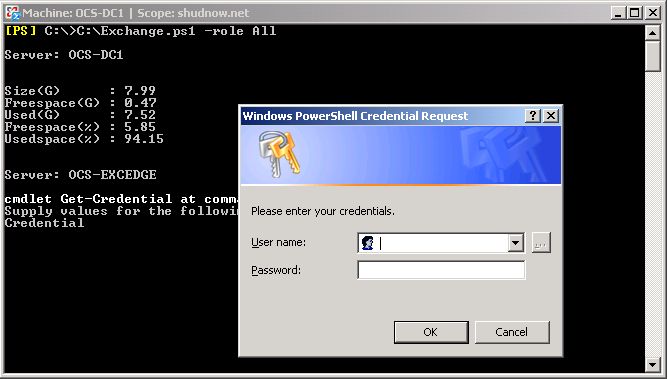
We still pulled information for our domain-joined Exchange Server, but now that our Edge server is up and we can ping it, it prompts us for authentication. On the screen, the server that it is prompting for is OCS-EXCEdge which is the name of our Edge Server. So let’s enter our credentials for this OCS-EXCEdge server.
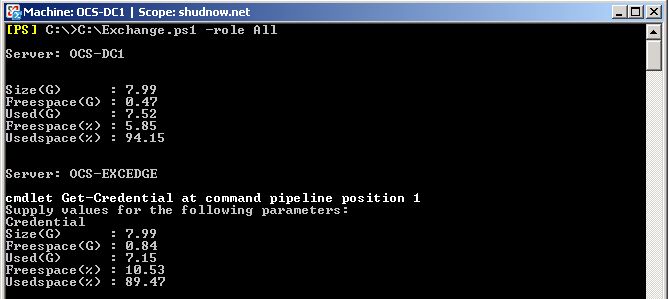
We now authenticated with the Edge Server and obtained disk information. If we instead hit cancel on the authentication prompt, we would get:
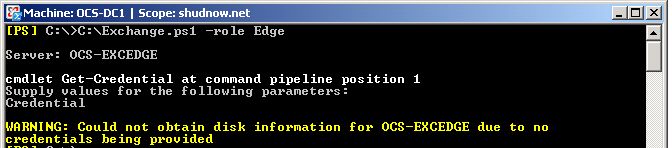
And the last thing I want to show is another safe guard in case you enter a wrong server type.


Leave a Reply